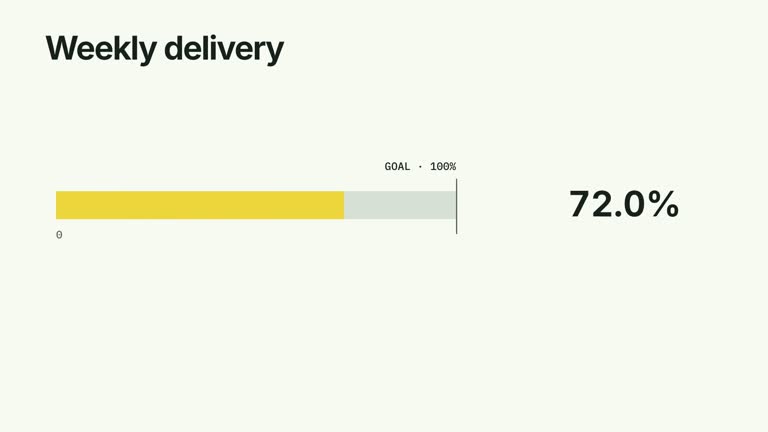
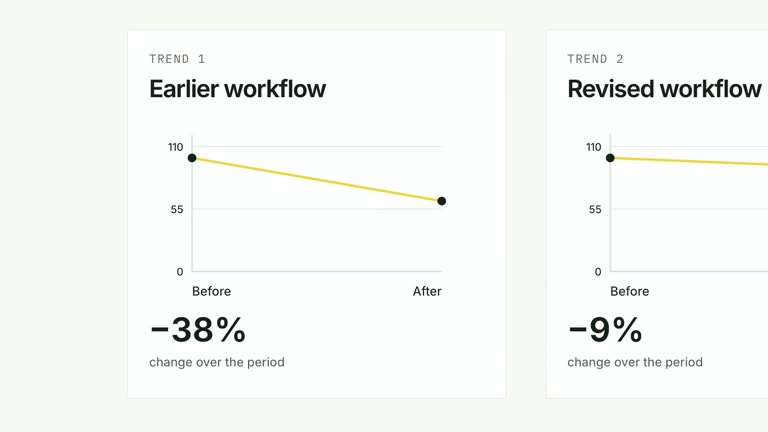
Make the size difference between two positive quantities easy to read. Two horizontal bars grow on the same linear scale while their counts travel with the endpoints; a bracket then introduces the larger-to-smaller multiple. This nine-second comparison suits a single pair in the same unit, with both quantities still visible when the ratio arrives.
What you get
A local generator, editable HyperFrames comparison and motion/review instructions. Generate a project with your own pair of values, then render the resulting segment.
Two labels, two positive values, a unit and ratioPrecision. The larger value fills the longest track and the smaller uses its proportional length; input order controls row placement rather than sorting the data.
Count-and-grow sequences beginning at 1.00 and 3.20 seconds, followed by a bracket from 5.15 seconds and the ratio from 5.55 seconds. Endpoint numbers move with bar growth instead of occupying a detached legend.
Four styles keep the same data and choreography: White & Yellow (white-yellow), Charcoal & Lime (charcoal-lime), Paper & Orange (paper-orange), and Black & White (midnight-ice). Semantic style overrides are supported; check contrast after changing them. Dark canvases use a fine grid. Local fonts include Inter, IBM Plex Mono for measurements and ordinals, Smiley Sans and Noto Sans SC. Chinese text selects Smiley Sans automatically, including accompanying Latin text; --zh-font noto-sans-sc selects Noto Sans SC, while --font takes precedence for a supplied font.
Before you choose
Choose a pair whose scale difference is the actual point of the explanation. Keep the denominator and unit clear, and distinguish a multiple from an increase: the animation cannot establish why one quantity is larger.
Good fit
A creator making a numerical comparison between two audiences, workloads or quantities measured on the same basis.
A brief teaching passage that needs both absolute values and an explicit multiple, rather than a multi-metric chart.
A recurring comparison format with consistent labels, scale logic and typography.
Not for
Zero or negative quantities, unlike units, or treating the displayed multiple as percentage growth.
Interactive sliders, automatic data collection, statistical significance testing or many-category comparisons.
Automatic long-form editing, generated presenter performances or music, or copying another creator’s identity and footage.
How to use
You say/creatormotion-comparison-ratio-bars Turn my supplied explanation into a white-yellow B-roll scene using the Ratio Bars effect. Use the text, data and media I provide, and ask for any required input that is missing.
Prepare labels and values with exactly two corresponding entries, plus unit and ratioPrecision. Both values must be positive. Confirm they describe the same unit, time period and population basis; the sample audience figures are illustrative.
Calculate larger divided by smaller independently and decide how many decimals make the comparison useful. The result is nondirectional: swapping row order does not invert the multiple. A ratio of 6× means six times as large, not a 6% or 600% increase.
Keep labels and numbers compact enough for the endpoint and right-hand result zones. The scene uses editable bars, numbers and a bracket; no footage, alpha matte or raster image is needed. Its headline is fixed in the effect code rather than exposed in the listed JSON inputs.
From the extracted package, prepare Node.js 22+, FFmpeg and HyperFrames CLI 0.8.30. Run node scripts/create.mjs --out PROJECT --data CONTENT.json --style white-yellow, substituting another documented palette if wanted. Read the motion specification and image policy before adapting the scene; use semantic --overrides for deliberate style changes.
Inspect the editable project at entry, each motion handoff and final hold, then render with the command printed by the generator. Check the resulting frames for text collisions, correct numbers and readable contrast. Keep at least 1.2 seconds for the final reading when editing, and compare all four palettes with identical content after structural changes. Narration, music and assembly into a longer film remain separate work. Verify both settled lengths against their values, the computed multiple and its unit. Endpoint counts use whole-number formatting while ratioPrecision controls the multiple; decimal quantities need a formatting review so the visible numbers do not contradict the calculation.
Requirements and costs
You bring
labels: provide your own content or retain the illustrative default. · values: provide your own content or retain the illustrative default. · unit: provide your own content or retain the illustrative default. · ratioPrecision: provide your own content or retain the illustrative default.
Dependencies
HyperFrames CLI 0.8.30 or compatible — required · Node.js 22 or newer — required · FFmpeg — required
Outside costs
Not collected yet
Tools used
HyperFrames
Publisher testing
v1.0.1 — Claude Code / Claude Desktop / Cowork / Codex / ChatGPT
FAQ
Yes. Row labels, quantities, unit and ratio precision are JSON inputs, with four palettes and optional semantic overrides. Editing the fixed headline requires a change in the generated scene/effect rather than a title field.
No. The two tracks, endpoint counters, bracket and result are generated as editable elements. Generic presenter and image instructions apply to other effects, not to this implementation.
Yes. Preserve the shared scale, count/endpoint synchronization and later bracket-to-ratio reading. Re-render after changes and keep enough time to read both absolute numbers alongside the multiple.
The code divides the maximum supplied value by the minimum. The result is always the larger-to-smaller multiple for valid positive inputs; row order does not turn it into a before/after rate.
The geometry and division use the numeric inputs, but the endpoint counters currently display whole numbers. Adjust and verify that formatting before presenting decimals as precise evidence.
User reviews
—0 reviews
Select a star to share your experience.
No reviews yet. Ratings appear once readers share real experiences.