Locate one stage within a short process, then expand its supporting details without losing the overall path. Numbered milestones establish the sequence and the chosen milestone receives an accent; a vertical stem branches into its detail lines. This 6.6-second shot presents an active stage you select, without tracking real project progress or marking separate completed and upcoming states.
What you get
A local generator, editable HyperFrames track/detail scene and motion/review instructions for a 1920×1080, 30 fps segment. Generate the composition and render a process explanation using your own stage labels.
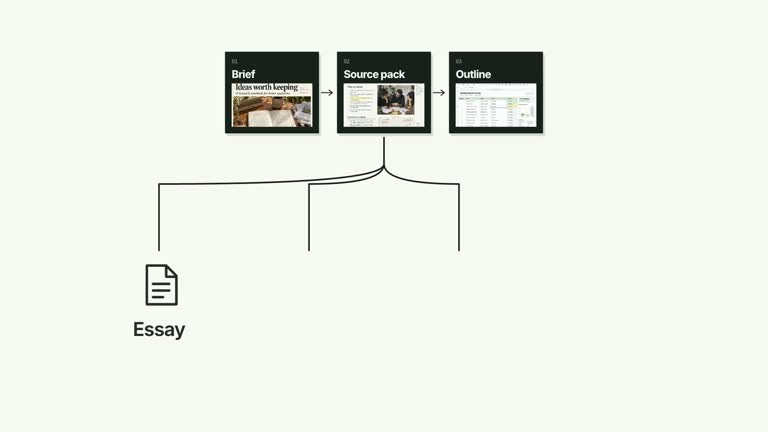
Up to five milestones, a zero-based activeIndex and up to four details. The selected node is accented, while other nodes share one neutral treatment. A continuous stem connects details to the chosen milestone.
Track drawing from 0.16 seconds, milestone/label entrances in array order, stem growth from 1.50 seconds and detail branches from 1.85 seconds. Details extend to the right for earlier positions or to the left when the selected node sits near the right edge.
Four styles keep the same data and choreography: White & Yellow (white-yellow), Charcoal & Lime (charcoal-lime), Paper & Orange (paper-orange), and Black & White (midnight-ice). Semantic style overrides are supported; check contrast after changing them. Dark canvases use a fine grid. Local fonts include Inter, IBM Plex Mono for measurements and ordinals, Smiley Sans and Noto Sans SC. Chinese text selects Smiley Sans automatically, including accompanying Latin text; --zh-font noto-sans-sc selects Noto Sans SC, while --font takes precedence for a supplied font.
Before you choose
Use the accent to identify the stage being explained, and state actual progress separately. Do not let the position of the chosen milestone imply that every earlier task has been verified as complete.
Good fit
A creator locating the current discussion within a small ordered process before explaining that stage in detail.
A short teaching passage needing both overall sequence and an anchored list of local actions or considerations.
A series using a consistent numbered path, active-stage emphasis and legible detail branches.
Not for
Automatically detecting project status, validating completion or separately coding completed/current/upcoming states through the current inputs.
A dated timeline, many milestones, multiple simultaneously expanded stages or arbitrary nested detail trees.
Automatic full-film editing, invented presenter footage or soundtrack, or copying another creator’s identity and materials.
How to use
You say/creatormotion-diagram-milestone-detail Turn my supplied explanation into a white-yellow B-roll scene using the Milestone with Detail Branch effect. Use the text, data and media I provide, and ask for any required input that is missing.
Prepare a nonempty milestones list with at most five entries, an integer activeIndex within that visible list and up to four details. The index is zero-based. The implementation clamps indices to the visible bounds, so verify the intended stage instead of relying on clamping after reordering.
Write detail lines specifically for the selected milestone. They are supplied text, not tasks inferred from the stage label. The active node receives accent styling; nodes before and after it are not separately marked as completed or upcoming in the current scene.
Keep milestone labels short enough for the horizontal track. Check which side receives the details when choosing a stage near the right edge; the branch direction changes with position. No presenter, raster image or alpha matte is used.
From the extracted package, prepare Node.js 22+, FFmpeg and HyperFrames CLI 0.8.30. Run node scripts/create.mjs --out PROJECT --data CONTENT.json --style white-yellow, substituting another documented palette if wanted. Read the motion specification and image policy before adapting the scene; use semantic --overrides for deliberate style changes.
Inspect the editable project at entry, each motion handoff and final hold, then render with the command printed by the generator. Check the resulting frames for text collisions, correct numbers and readable contrast. Keep at least 1.2 seconds for the final reading when editing, and compare all four palettes with identical content after structural changes. Narration, music and assembly into a longer film remain separate work. Inspect active-node identity, stem origin and every supporting connector in actual MP4 frames. Keep text at least 24 px and check first/last milestone placements with your wording. Preserve the detail branch as the defining explanation rather than reducing the scene to dates on a line.
Requirements and costs
You bring
milestones: provide your own content or retain the illustrative default. · activeIndex: provide your own content or retain the illustrative default. · details: provide your own content or retain the illustrative default.
Dependencies
HyperFrames CLI 0.8.30 or compatible — required · Node.js 22 or newer — required · FFmpeg — required
Outside costs
Not collected yet
Tools used
HyperFrames
Publisher testing
v1.0.1 — Claude Code / Claude Desktop / Cowork / Codex / ChatGPT
FAQ
Yes. milestones, activeIndex and details are JSON inputs, with palettes and semantic overrides. The selected node and positional detail branch remain part of the scene structure.
No. The track, numbered nodes, labels and detail routes are editable generated elements. The shared media policy adds no footage or raster requirement to this implementation.
Yes. Preserve the overall track, active milestone and anchored stem/detail reading. Milestones currently arrive in array order; selecting a later node does not make it enter first.
Not separately in the current implementation. It accents the selected milestone and treats other nodes alike, despite broader three-state wording in the source description.
No. You provide activeIndex. The scene is a deterministic presentation of that choice, not a live project tracker or a completion check.
User reviews
—0 reviews
Select a star to share your experience.
No reviews yet. Ratings appear once readers share real experiences.