CreatorMotion · Overlapping Testimonial Hold

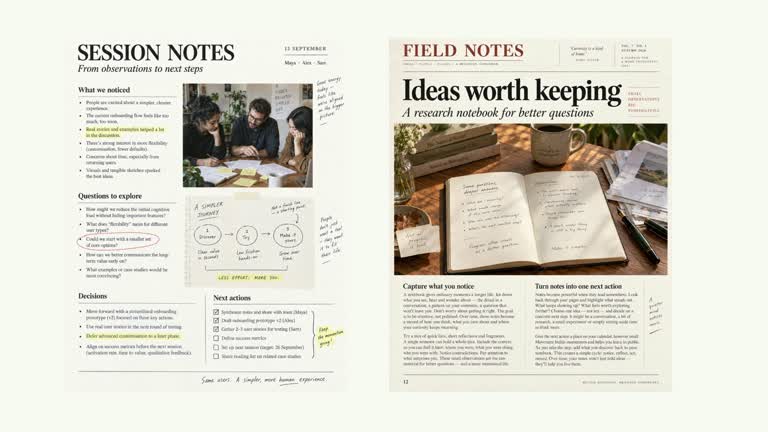
Give a small collection of quotations a mostly still reading shot. Four paper-like clippings overlap slightly while the whole wall makes a subtle 1.5% push. You can use editable quote/author text with avatar images or replace a clipping with your own testimonial screenshot. This seven-second effect presents supplied feedback; its defaults are illustrative.

What you get

  • A local generator, editable HyperFrames effect and motion/review instructions. Generate the 1920×1080 composition and render a 30 fps reading segment for your own edit.
  • Up to four testimonials with author and text fields, using avatar-1–avatar-4 by default. Optional testimonial-1–testimonial-4 screenshot slots, or per-item image/avatar keys, can replace the card contents or avatar.
  • A short whole-wall entrance followed by a slow 1.015 scale move, with no separate staggered quote entrances or rotating front-sheet replacements. The complete wall stays composed for reading.
  • Four palettes preserve geometry and timing: White & Yellow (white-yellow), Charcoal & Lime (charcoal-lime), Paper & Orange (paper-orange) and Black & White (midnight-ice). Semantic overrides adapt styling; check contrast afterwards. Dark canvases retain a fine stationary grid. Fonts are local: Inter, IBM Plex Mono for measurements/ordinals, Smiley Sans and Noto Sans SC. Chinese text automatically selects Smiley Sans, including Latin words in the composition; --zh-font noto-sans-sc chooses the plainer face and --font embeds your own. Inspect wrapping after changes.

Before you choose

Decide which feedback matters before arranging the wall. Four readable, accurately attributed quotations are more useful than a dense visual impression of endorsement, and the example avatars, times and context should never be mistaken for real review records.
Good fit

  • A creator showing a few authorized quotations with sufficient time to read them.
  • A short teaching or case-study passage where the feedback itself is the content, using concise quotes.
  • A series needing consistent paper, typography and palette treatment for supplied feedback.

Not for

  • Collecting or validating reviews, generating real endorsements, or using the default names and quotations as factual social proof.
  • A long transcript or a rapidly cycling carousel. Only four fixed quote positions appear and the intended shot is mostly still.
  • Automatic long-form editing, generated presenter performance or music, or copying a reference creator’s identity and materials.

How to use

You say/creatormotion-collage-testimonial-wall Turn my supplied explanation into a white-yellow B-roll scene using the Overlapping Testimonial Hold effect. Use the text, data and media I provide, and ask for any required input that is missing.
  1. Prepare up to four author/text objects using genuine authorized quotations, or clearly label an illustrative example. Do not keep default example names attached to real quotes or imply the generated avatars identify actual authors.

  2. Choose the material mode for each clipping. Map avatar-1–avatar-4 for editable text cards, or testimonial-1–testimonial-4 for full screenshot replacements; item.avatar and item.image can select other mapped keys. A screenshot bypasses the editable author/text card content, so verify the source image itself.

  3. Review fixed template wording before using the editable-card mode: it adds WORKSHOP NOTES, preset times and Shared after the session. Those strings do not come from the testimonial record and may need implementation edits for your context. No presenter footage or matte is required.

  4. Prepare Node.js 22+, FFmpeg and the documented HyperFrames CLI 0.8.30. From the extracted package run node scripts/create.mjs --out PROJECT --data CONTENT.json with the chosen --style. Map replacement images through --images; relative paths resolve beside that JSON and unlisted slots retain defaults. Add semantic --overrides as needed and read the image policy before adapting materials.

  5. Lint, validate and inspect the generated HyperFrames project, then render at 1920×1080 and 30 fps with the pinned CLI. Check actual MP4 frames at the opening, changes of focus and final hold for cropping, overlap, contrast and seams. Review all palettes when editing the module. Narration, music and assembly remain separate work; a silent preview does not establish audio synchronization. Read every quote and attribution at playback speed. Inspect overlaps and screenshot fit, and ensure any cropped decorative edge does not hide essential feedback or author information.

Requirements and costs

You bring
testimonials: provide your own content or retain the illustrative default.
Dependencies
HyperFrames CLI 0.8.30 or compatible — required · Node.js 22 or newer — required · FFmpeg — required
Outside costs
Not collected yet
Tools used
HyperFrames
Publisher testing
v1.0.1 — Claude Code / Claude Desktop / Cowork / Codex / ChatGPT

FAQ

User reviews

—0 reviews

Select a star to share your experience.

No reviews yet. Ratings appear once readers share real experiences.

Similar Skills

View all skills