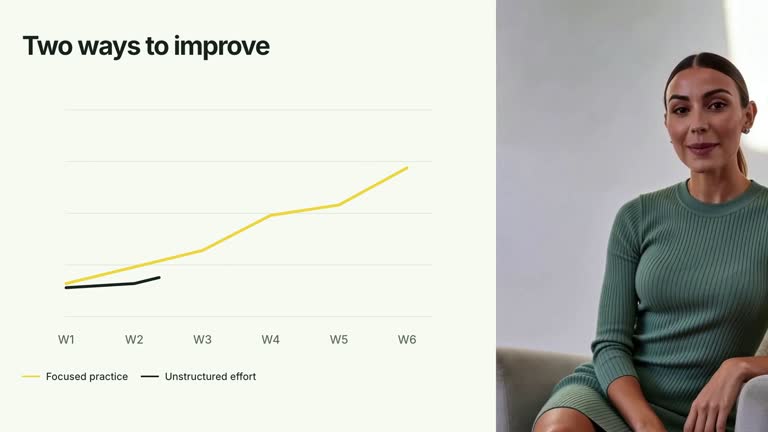
Introduce a short chronology with large date labels, small timeline nodes and supporting captions. Each milestone settles in sequence on one horizontal track, then the completed story holds for reading. This 6.6-second shot can include a supplied presenter in a lower corner; it presents your ordered milestones without interpreting their dates or calculating elapsed time.
What you get
A local generator, editable HyperFrames timeline and motion/review instructions for a 1920×1080, 30 fps segment. Generate the project from your milestone content, then render the chronological explanation.
Up to five milestones with date and caption, plus a presenter toggle. Nodes are evenly spaced by array index; date fields are displayed text rather than parsed temporal values.
A track reveal from 0.18 seconds and ordered node/date/caption entrances from 0.55 seconds, with successive milestones 0.70 seconds apart. Optional presenter footage stays in a separate lower corner while all settled milestone labels remain visible.
Four styles keep the same data and choreography: White & Yellow (white-yellow), Charcoal & Lime (charcoal-lime), Paper & Orange (paper-orange), and Black & White (midnight-ice). Semantic style overrides are supported; check contrast after changing them. Dark canvases use a fine grid. Local fonts include Inter, IBM Plex Mono for measurements and ordinals, Smiley Sans and Noto Sans SC. Chinese text selects Smiley Sans automatically, including accompanying Latin text; --zh-font noto-sans-sc selects Noto Sans SC, while --font takes precedence for a supplied font.
Before you choose
Treat the timeline as an ordered narrative unless you deliberately calibrate it. Verify dates and order before animating, and make interval differences explicit so equal spacing does not mislead the viewer.
Good fit
A creator explaining a few stages in a release, project history or planned progression.
A short teaching passage needing chronology itself as the visual sequence, without an active-node detail tree.
A series with consistent date/caption typography and optional on-camera context.
Not for
Automatically sorting dates, calculating durations or interpreting equal visual gaps as equal real time intervals.
A live schedule, dependency planner, completion tracker or a long crowded history through the current input.
Automatic full-film editing, generated presenter performances or music, or copying another creator’s identity and source material.
How to use
You say/creatormotion-diagram-timeline-nodes Turn my supplied explanation into a white-yellow B-roll scene using the Timeline Node Reveal effect. Use the text, data and media I provide, and ask for any required input that is missing.
Prepare one to five milestones with concise date and caption strings, already in the intended order. The implementation shows the first five and does not parse or sort dates. The supplied Week 1/Week 3/Week 6 example is illustrative.
Explain unequal time intervals in the date labels or narration. Nodes use equal spacing regardless of the date text, so distance along the track is ordinal rather than a calibrated duration scale. Keep large date labels short and captions compact enough to avoid neighboring text areas.
Leave presenter false for the vector/text-only timeline. To include a presenter, set it true and supply --media RECORDING.mp4 covering the 6.6-second visible interval. Inspect the small lower frame’s strong crop/zoom against the actual footage; do not loop a short take to imply continuous performance. No raster illustration or matte is required.
From the extracted package, prepare Node.js 22+, FFmpeg and HyperFrames CLI 0.8.30. Run node scripts/create.mjs --out PROJECT --data CONTENT.json --style white-yellow, substituting another documented palette if wanted. Read the motion specification and image policy before adapting the scene; use semantic --overrides for deliberate style changes.
Inspect the editable project at entry, each motion handoff and final hold, then render with the command printed by the generator. Check the resulting frames for text collisions, correct numbers and readable contrast. Keep at least 1.2 seconds for the final reading when editing, and compare all four palettes with identical content after structural changes. Narration, music and assembly into a longer film remain separate work. Inspect every node/date/caption alignment and the final settled interval in actual MP4 frames. Check presenter overlap with longer captions as well as face framing. Keep supporting text at least 24 px and preserve the ordered timeline rather than adding an unrelated active-stage detail list.
Requirements and costs
You bring
milestones: provide your own content or retain the illustrative default. · presenter: provide your own content or retain the illustrative default.
Dependencies
HyperFrames CLI 0.8.30 or compatible — required · Node.js 22 or newer — required · FFmpeg — required
Outside costs
Not collected yet
Tools used
HyperFrames
Publisher testing
v1.0.1 — Claude Code / Claude Desktop / Cowork / Codex / ChatGPT
FAQ
Yes. milestones supplies date/caption pairs and presenter enables the optional footage, with four palettes and semantic overrides. Node spacing follows array position rather than the dates.
Only if you enable presenter. Supply a suitable local clip through --media as well as setting the toggle; the basic timeline needs no footage or raster images.
Yes. Preserve track construction, ordered date/caption arrivals and a readable final hold. Re-render after count or label changes and inspect any presenter/text interaction.
No. date is displayed text and milestones remain in input order. Sort and verify the chronology yourself before generation.
No. Displayed milestones are evenly spaced. Use explicit date labels to communicate actual intervals, or adapt the geometry if a quantitative time scale is essential.
User reviews
—0 reviews
Select a star to share your experience.
No reviews yet. Ratings appear once readers share real experiences.