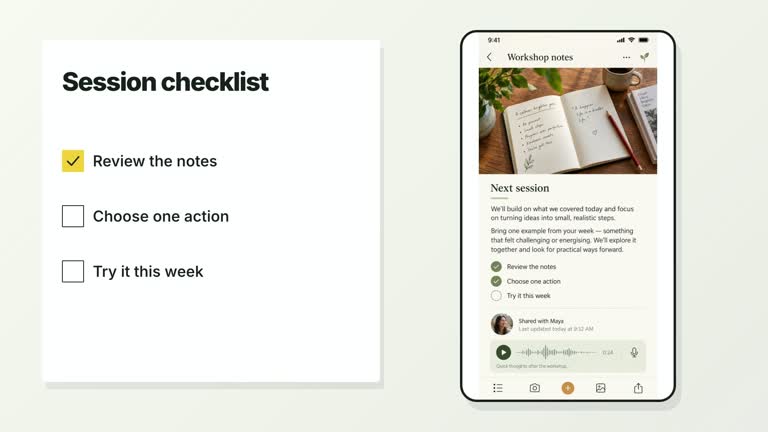
Turn a clear area of a room photograph into a short checklist. An authored camera reframe makes space, the presenter layer at the edge softens, and numbered lines reveal directly across the wall. The 6.8-second shot uses a real wall plate and editable type rather than a detached card panel. You choose the wall and presenter regions to fit your material.
What you get
A local generator, editable HyperFrames room/checklist composition and motion/review instructions for 1920×1080 at 30 fps. Generate it from the supplied room image, text and presenter take, then render the scene.
Up to five items, plus wallRegion and presenterRegion as [x,y,width,height] rectangles in composition coordinates. A required wall-plate raster provides the empty light wall. Presenter-matte is preferred; the effect can use the full rectangular source video at the edge when no cutout is provided.
Camera reframe from 0.16 to 1.21 seconds, presenter defocus from 0.55 to 1.25 seconds and list-row reveals from 1.35 seconds at 0.86-second spacing. Each row is exposed with a 0.62-second wipe; it is not a handwriting or character-recognition process. Natural media colors remain across palettes.
Four styles keep the same data and choreography: White & Yellow (white-yellow), Charcoal & Lime (charcoal-lime), Paper & Orange (paper-orange), and Black & White (midnight-ice). Semantic style overrides are supported; check contrast after changing them. Dark canvases use a fine grid. Local fonts include Inter, IBM Plex Mono for measurements and ordinals, Smiley Sans and Noto Sans SC. Chinese text selects Smiley Sans automatically, including accompanying Latin text; --zh-font noto-sans-sc selects Noto Sans SC, while --font takes precedence for a supplied font.
Before you choose
Choose the room plate before deciding the list width. The effect depends on a believable clear wall and restrained copy; review spatial integration and line readability before accepting the camera move or presenter blur.
Good fit
A creator presenting a concise setup checklist within a room-like visual context.
A short teaching passage where a wall should become the reading surface while the presenter recedes.
A series with consistent numbered type, scene regions and a calm completed list.
Not for
Automatic wall detection, perspective reconstruction, inpainting or deciding whether checklist items are actually complete.
More than five displayed items, long lines or assuming the default regions fit every room and presenter recording.
Automatic complete-film editing, generating absent presenter footage or music, or copying another creator’s identity and source materials.
How to use
You say/creatormotion-type-wall-checklist Turn my supplied explanation into a white-yellow B-roll scene using the Wall Checklist Reveal effect. Use the text, data and media I provide, and ask for any required input that is missing.
Prepare up to five short items. Choose or reuse a wall-plate image with a genuinely clear light area; replace it through --images MAP.json using the wall-plate key when needed. Relative paths resolve beside the map and unspecified defaults remain. Follow the image policy.
Set wallRegion and presenterRegion in 1920×1080 coordinates after inspecting the actual plate. The wall rectangle controls the list area and the presenter rectangle the edge video. Rows are single-line and can clip rather than wrap; verify every complete item. The current code begins the reframe at 1.30 scale, despite an older constraint mentioning 1.25.
Bring a continuous local --media take covering 6.8 seconds, muted and without looping. A same-frame alpha cutout supplied with --matte FILE or presenter-matte is preferred. Default --matte auto uses pinned local remove-background with first-use model download and checksum caching; alpha footage is also recognized. Unlike required-matte scenes, --matte off permits the rectangular video fallback here.
From the extracted package, prepare Node.js 22+, FFmpeg and HyperFrames CLI 0.8.30. Run node scripts/create.mjs --out PROJECT --data CONTENT.json --style white-yellow, substituting another documented palette if wanted. Read the motion specification and image policy before adapting the scene; use semantic --overrides for deliberate style changes. Add --media /absolute/PRESENTER.mp 4 and an available --matte /absolute/MATTE.webm; pass --images MAP.json for a replacement wall plate. Reframe media together when using a cutout. For 4K delivery, bring suitable source and add --resolution landscape-4k on rendering.
Inspect the editable project at entry, each motion handoff and final hold, then render with the command printed by the generator. Check the resulting frames for text collisions, correct numbers and readable contrast. Keep at least 1.2 seconds for the final reading when editing, and compare all four palettes with identical content after structural changes. Narration, music and assembly into a longer film remain separate work. Check full-canvas coverage during the camera move, presenter/room integration and every revealed line. Keep plain deep-ink ordinals on a light wall; palette changes do not recolor the natural room. Inspect matte edges if used, and compare the final list at the delivery size.
Requirements and costs
You bring
items: provide your own content or retain the illustrative default. · wallRegion: provide your own content or retain the illustrative default. · presenterRegion: provide your own content or retain the illustrative default.
Dependencies
HyperFrames CLI 0.8.30 or compatible — required · Node.js 22 or newer — required · FFmpeg — required
Outside costs
Not collected yet
Tools used
HyperFrames
Publisher testing
v1.0.2 — Claude Code / Claude Desktop / Cowork / Codex / ChatGPT
FAQ
items and both region rectangles come from JSON. Four palettes and overrides are available, but the natural media colors and deep-ink wall text are intentional fixed treatments, not colored number badges.
Yes. Supply the continuous local presenter take and use a real wall-plate raster, with a bundled default available for the plate. An aligned matte is preferred and can be generated locally; a rectangular-video fallback is supported when automatic cutting is disabled.
Yes. Preserve the reframe, presenter defocus and sequential complete-line reveals. Render after changing coordinates, crop or timing; the wall and presenter regions are manually selected.
No. You supply wallRegion and presenterRegion. The scene positions content in those rectangles without wall detection, automatic perspective matching or background repair.
Rows are single-line with clipped overflow. Shorten the item or adjust type/region deliberately, and render to check the entire line; the five-item cap alone does not guarantee readable fit.
User reviews
—0 reviews
Select a star to share your experience.
No reviews yet. Ratings appear once readers share real experiences.