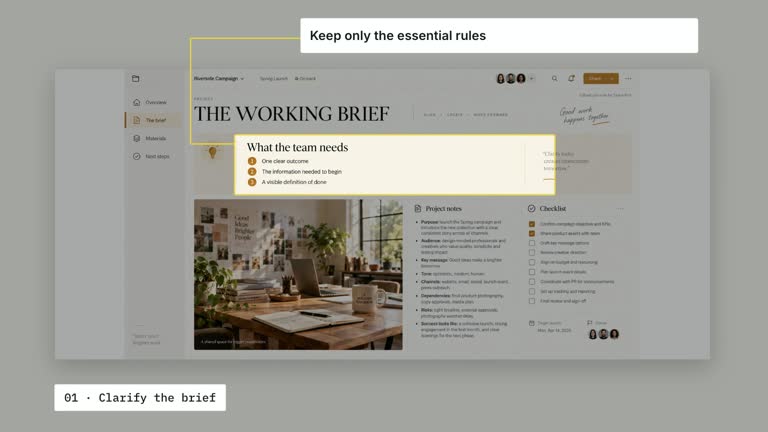
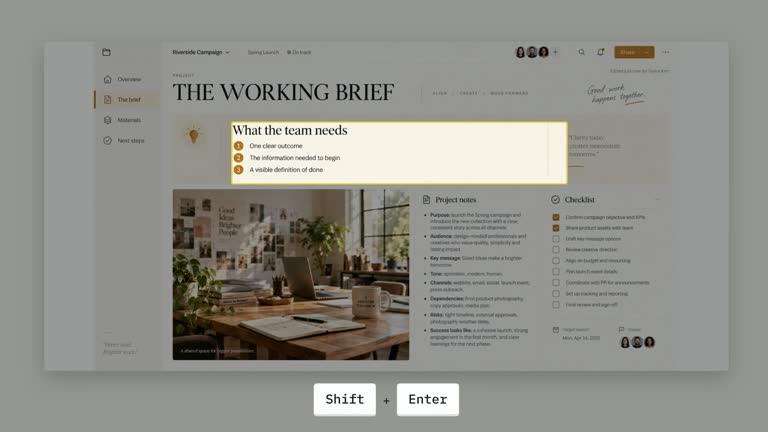
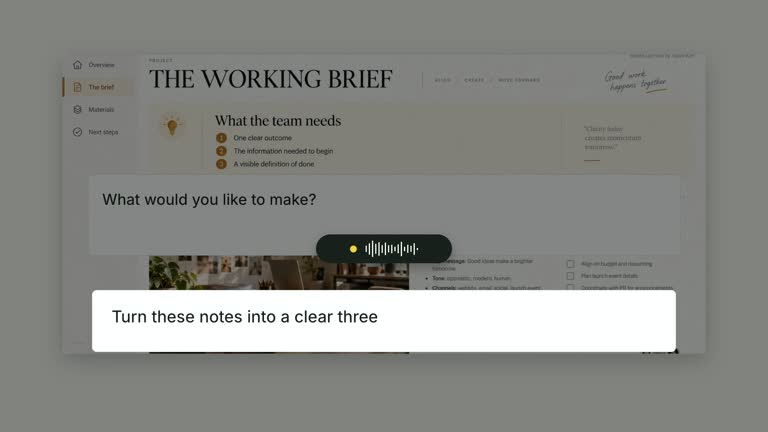
Keep a source image in view while enlarging a prepared excerpt into a separate reading area. The source title and label remain above the text as marker sweeps emphasize chosen phrases in sequence. This ten-second scene presents an evidence relationship you supply; it does not retrieve the source, transcribe it or determine whether it supports the spoken claim.
What you get
A local generator, editable HyperFrames source/excerpt composition and motion/review instructions for a 1920×1080, 30 fps segment. Generate and render the reading sequence from your source image and checked text.
sourceTitle, sourceLabel, excerpt and highlights containing exact text plus tone accent or support. A required article-image raster slot supplies the visible source panel, with bundled illustrative material available.
A source-image/title establishment, divider reveal and brief excerpt scale-up from 0.70 seconds. Marker sweeps begin at two seconds with 1.40-second spacing; both source context and complete excerpt remain available in the final side-by-side layout.
Four styles keep the same data and choreography: White & Yellow (white-yellow), Charcoal & Lime (charcoal-lime), Paper & Orange (paper-orange), and Black & White (midnight-ice). Semantic style overrides are supported; check contrast after changing them. Dark canvases use a fine grid. Local fonts include Inter, IBM Plex Mono for measurements and ordinals, Smiley Sans and Noto Sans SC. Chinese text selects Smiley Sans automatically, including accompanying Latin text; --zh-font noto-sans-sc selects Noto Sans SC, while --font takes precedence for a supplied font.
Before you choose
Verify the excerpt against the real source before highlighting it, including surrounding context. Use emphasis to help the audience inspect a claim, while keeping source authenticity and factual support separate from polished presentation.
Good fit
A creator explaining a small number of exact passages from a source whose context should remain visible.
A teaching passage where the excerpt must be readable separately from the source image.
A series using consistent source headings, excerpt typography and purposeful phrase emphasis.
Not for
Automatically finding sources, authenticating a quotation, transcribing a screenshot or fact-checking a spoken claim.
Overlapping highlight substrings, automatic selection of key passages or treating an illustrative source image as genuine evidence.
Automatic full-film editing, generated presenter footage or music, or copying another creator’s identity and material.
How to use
You say/creatormotion-spotlight-quote-evidence Turn my supplied explanation into a white-yellow B-roll scene using the Source Quote Evidence effect. Use the text, data and media I provide, and ask for any required input that is missing.
Prepare sourceTitle, sourceLabel and an accurately checked excerpt. Write highlights in the intended reading order, each with exact text and tone accent/support. Keep matches nonoverlapping. The code uses the first occurrence of each substring, so repeated phrases require a deliberate choice or matching revision.
Reuse the bundled article-image only for illustration, or replace that exact slot with relevant source material through --images MAP.json. Relative paths resolve beside the map. The image is mandatory even though the high-level inputs omit its key; the excerpt is supplied separately rather than extracted from it.
Keep the excerpt compact enough for the right-hand reading area and choose a few highlights. Missing phrases are not inserted, and their scheduled selectors may have no target. Check image, title, label and transcription together. No presenter or matte is used; spoken synchronization requires separate real audio/cues.
From the extracted package, prepare Node.js 22+, FFmpeg and HyperFrames CLI 0.8.30. Run node scripts/create.mjs --out PROJECT --data CONTENT.json --style white-yellow, substituting another documented palette if wanted. Read the motion specification and image policy before adapting the scene; use semantic --overrides for deliberate style changes.
Inspect the editable project at entry, each motion handoff and final hold, then render with the command printed by the generator. Check the resulting frames for text collisions, correct numbers and readable contrast. Keep at least 1.2 seconds for the final reading when editing, and compare all four palettes with identical content after structural changes. Narration, music and assembly into a longer film remain separate work. Inspect every marked phrase, support-tone contrast, line wrapping and source/excerpt relationship in actual MP4 frames. Preserve at least 1.2 seconds of final reading after edits and ensure added highlights do not overrun the ten-second schedule.
Requirements and costs
You bring
sourceTitle: provide your own content or retain the illustrative default. · sourceLabel: provide your own content or retain the illustrative default. · excerpt: provide your own content or retain the illustrative default. · highlights: provide your own content or retain the illustrative default.
Dependencies
HyperFrames CLI 0.8.30 or compatible — required · Node.js 22 or newer — required · FFmpeg — required
Outside costs
Not collected yet
Tools used
HyperFrames
Publisher testing
v1.0.1 — Claude Code / Claude Desktop / Cowork / Codex / ChatGPT
FAQ
Yes. Source heading fields, excerpt and highlight text/tones are JSON inputs, with four palettes and semantic overrides. Replace article-image separately when changing the source material.
No presenter footage is needed. article-image is a required raster with a bundled example available. For actual evidence, use an appropriate source image rather than treating the default illustration as verified material.
Yes. Preserve visible source context, excerpt enlargement and sequential phrase sweeps. Re-render after wording changes and check the exact marked spans and final reading area.
No. excerpt is independent supplied text. Verify transcription, omissions and context yourself before using it as a quotation.
The first exact occurrence is used. Missing substrings are filtered from the markup; overlapping ranges are not a supported way to build nested emphasis.
User reviews
—0 reviews
Select a star to share your experience.
No reviews yet. Ratings appear once readers share real experiences.