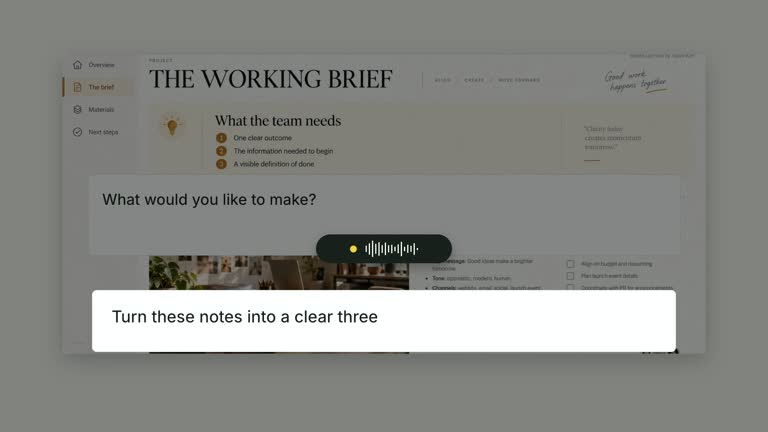
Connect a keyboard shortcut to the control it affects and a prepared resulting view. Keycaps perform a brief downstroke before the target is isolated; the result image then replaces the source without an empty transition. This nine-second scene is an explanatory before/after sequence, not a real keypress sent to an application.
What you get
A local generator, editable HyperFrames source/shortcut/result shot and motion/review instructions for a 1920×1080, 30 fps segment. Generate and render the sequence using supplied screen material and keys.
image and result as required screenshot slot references, keys as the displayed keycap list and target as normalized [x,y,width,height] within a 1640×790 panel. Bundled example rasters are available for the source and result.
Keycaps from 0.80 seconds, short individual presses from 1.18 seconds and target focus/group push from 1.65 seconds. Focus clears and the camera returns before the result reveals from 6.10 seconds; the source is removed after that handoff.
Four styles keep the same data and choreography: White & Yellow (white-yellow), Charcoal & Lime (charcoal-lime), Paper & Orange (paper-orange), and Black & White (midnight-ice). Semantic style overrides are supported; check contrast after changing them. Dark canvases use a fine grid. Local fonts include Inter, IBM Plex Mono for measurements and ordinals, Smiley Sans and Noto Sans SC. Chinese text selects Smiley Sans automatically, including accompanying Latin text; --zh-font noto-sans-sc selects Noto Sans SC, while --font takes precedence for a supplied font.
Before you choose
Test the real shortcut outside the animation and capture a matching result before authoring the shot. Use the focus border to clarify the affected control, not to imply that a simulated keypress has demonstrated working functionality.
Good fit
A creator teaching a known shortcut with a clear affected control and an accurate prepared result.
A short passage needing action, focus and result in distinct reading stages.
A series using consistent keycaps, target rectangles and clean source/result transitions.
Not for
Sending actual keystrokes, discovering keyboard shortcuts, running an application command or generating the result screenshot.
Automatically locating controls, treating arbitrary screenshots as editable interfaces or assuming long key lists fit the fixed action schedule.
Automatic full-film editing, generated presenter footage or music, or copying another creator’s identity and interfaces.
How to use
You say/creatormotion-spotlight-shortcut-target Turn my supplied explanation into a white-yellow B-roll scene using the Shortcut Target effect. Use the text, data and media I provide, and ask for any required input that is missing.
Prepare image, keys, target and result. Verify the shortcut and its outcome independently before using the animation to teach it. Keycap text and result imagery are separate supplied content; no command creates the result inside the scene.
Reuse the bundled source/result images or replace their named slots through --images MAP.json, with paths relative to that file. Both images are mandatory despite older descriptions of an editable fallback interface. Keep before and after material appropriate to the same operation.
Recalibrate target after replacing the source screenshot, accounting for contain-fit margins inside the display panel. Keep the key list compact enough to press before target focus. No presenter or alpha matte is used; the scene does not listen for or send operating-system input.
From the extracted package, prepare Node.js 22+, FFmpeg and HyperFrames CLI 0.8.30. Run node scripts/create.mjs --out PROJECT --data CONTENT.json --style white-yellow, substituting another documented palette if wanted. Read the motion specification and image policy before adapting the scene; use semantic --overrides for deliberate style changes.
Inspect the editable project at entry, each motion handoff and final hold, then render with the command printed by the generator. Check the resulting frames for text collisions, correct numbers and readable contrast. Keep at least 1.2 seconds for the final reading when editing, and compare all four palettes with identical content after structural changes. Narration, music and assembly into a longer film remain separate work. Inspect keypress-to-target timing, focus boundary and the source/result replacement in actual MP4 frames. Check for seams or blank intervals and verify that the result shows the operation you describe. Preserve at least 1.2 seconds of final reading and the coordinated source/control camera plane.
Requirements and costs
You bring
image: provide your own content or retain the illustrative default. · keys: provide your own content or retain the illustrative default. · target: provide your own content or retain the illustrative default. · result: provide your own content or retain the illustrative default.
Dependencies
HyperFrames CLI 0.8.30 or compatible — required · Node.js 22 or newer — required · FFmpeg — required
Outside costs
Not collected yet
Tools used
HyperFrames
Publisher testing
v1.0.1 — Claude Code / Claude Desktop / Cowork / Codex / ChatGPT
FAQ
Yes. Screenshot references, keycap strings and target geometry are JSON inputs, with four palettes and semantic overrides. Text embedded in screenshots is changed by replacing the images.
No presenter footage is needed. Required source and result rasters have bundled examples and can be replaced locally. No alpha matte is used.
Yes. Keep the keypress before target emphasis and the later clean result handoff. The current revision removes the repeated focus pulse; re-render after changes to inspect both transitions and the final result.
No. Keycaps are animated visual elements. The scene does not control another app or produce the result through that command.
No. result names an already supplied raster slot. Prepare a valid resulting view and verify that it matches the shortcut being explained.
User reviews
—0 reviews
Select a star to share your experience.
No reviews yet. Ratings appear once readers share real experiences.