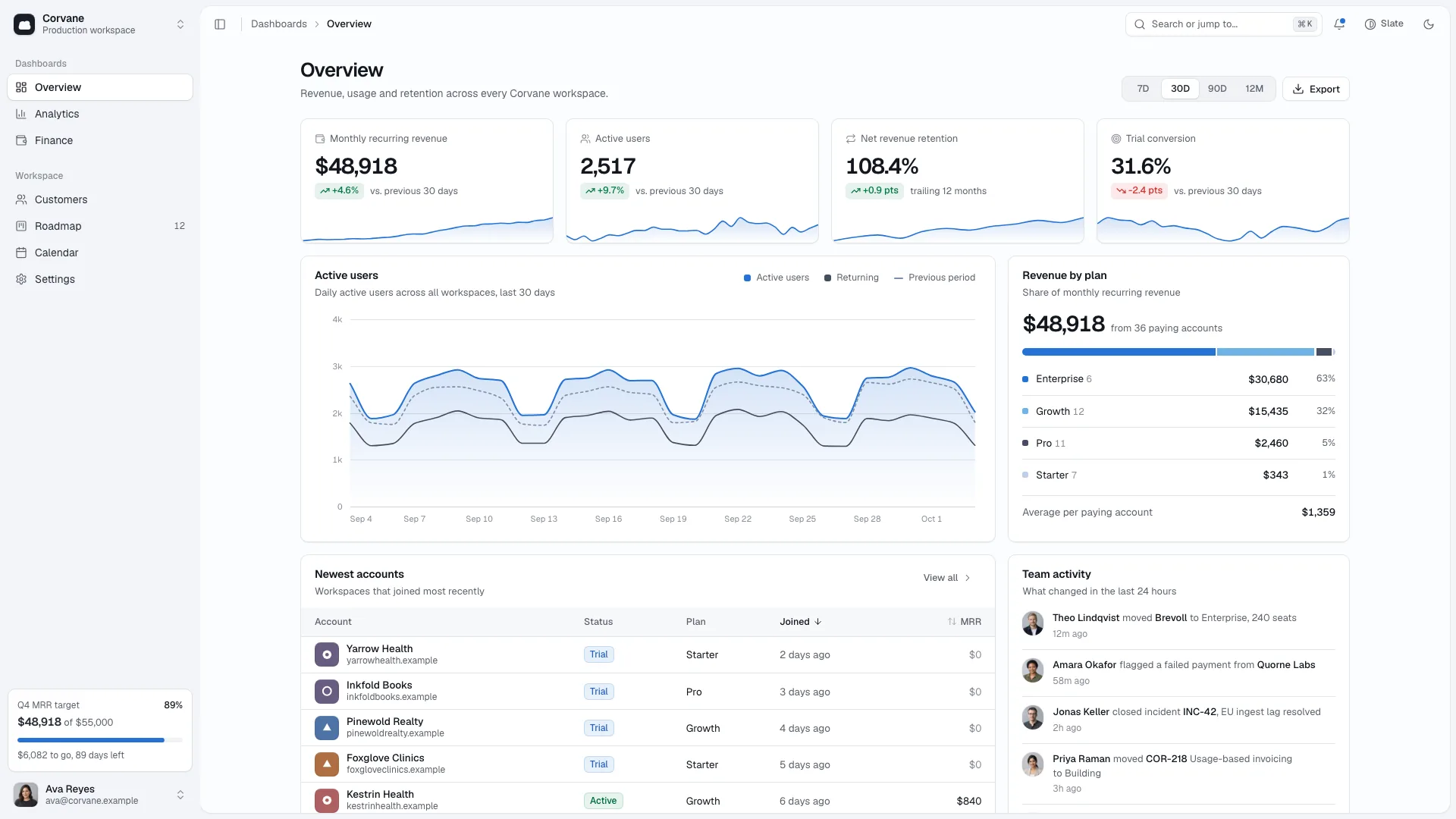
Bring customer, revenue, campaign and team work into one explorable operations console. Orbit Admin Dashboard uses dense slate panels, an operations-blue accent and a complete dark theme to connect charts, account records and a task board. It is a local front-end foundation that can be rebranded and connected to your systems, rather than a live business service.
What you get
Six connected views—Overview, Revenue, Customers, Campaigns, Workflows and Settings—plus a designed not-found view. The shell includes collapsible navigation, workspace/account controls, notifications, command search and shortcuts. Instrument Sans and IBM Plex Mono keep figures, labels and identifiers distinct.
Four-tile KPI strips and inline-SVG charts for trends, previous-period comparison, movement, plan mix, funnel, goals and capacity. Switching 7D, 30D, 90D or 12M redraws the relevant figures/chart data; the main chart also offers a table view and keyboard reading. Local customer records and generated time series drive much of the display, while some comparison and churn values are prepared examples.
A customer table with search, segment/plan/owner filters, sortable columns, pagination, selection and floating bulk actions. Owner assignment supports Undo; detail drawers include previous/next records, account figures, usage, contacts, open tasks and notes. CSV export is implemented for ordinary browser contexts and reports when the preview blocks downloads.
Campaign cards with search, channels, sorting, pacing/budget measures and live/paused switches. A task board supports drag-and-drop plus a keyboard move menu, assignee filtering and new-task forms. General settings track unsaved changes with Save/Discard; notification, member and security controls supply further local prototype states.
Complete light/dark surfaces and charts, responsive phone tabs and card-style rows, mobile sheets and reduced-motion behavior. The package supplies ten generic fictional portraits for team avatar slots; other contacts use initials.
One embedded offline HTML file by default, including fonts and selected portraits, plus the source template, reference guides, builder and static validator. Existing or requested React, Next.js, Vue, Svelte or Astro projects instead receive the same shell and behavior in native components/routes.
Before you choose
Use a real operating question to choose each panel, then trace its answer back to the records and calculation. Review a full action-and-Undo path before adding more charts. Keep browser-local edits and downloadable CSV separate from server persistence, mailed invitations and enforced security.
Good fit
SaaS teams exploring how revenue, customers and team actions should connect in a credible back-office demo.
Retail or subscription businesses that can recast campaigns as promotions and workflows as fulfilment.
Support or field-service teams able to map revenue to ticket measures and customer records to sites or accounts.
Not for
A live database, billing or email system out of the box. Invites, reminders and security toggles provide local feedback and do not establish actual delivery or access enforcement.
A public marketing site or storefront; the structure is an internal console.
A sparse, highly illustrated or airy visual identity; compact data panels define this design.
How to use
You say/orbit-admin-dashboard Build an ops console for Larderly, a purchasing-software company, with revenue, customers, campaigns and a team board.
Describe your business model, four headline metrics, record collections, team and workflow stages, or provide suitable data. Identify its as-of date, currency and reporting periods. Any missing people, customers, amounts or outcomes must remain explicitly fictional examples for confirmation.
Rename, merge or remove views to suit the domain while keeping the shell and a useful set of at least three views plus not-found. Replace the product name and workspace separately: a vendor demo can use a fictional customer workspace, while an internal back office should use the real organization. Update navigation, command search, shortcuts and cross-links with every route change.
Model records and metrics before styling them. Reconcile account MRR and counts with their rows, label sample comparisons as such, and adapt the time-series aggregation if the business runs weekly. Keep four headline tiles and match plan ranks/colors, owners and workflow stages to actual records. Test an all-zero period and an empty table after replacing data.
Rebrand content beyond the main arrays: date/status labels, alerts, goal targets, notes, settings, currency formatting and form placeholders. Supply real portraits for a real team or use initials/disclosed stand-ins. Ten generic headshots are provided, so new image generation is usually unnecessary; additional portraits can use the agent’s image tool and may incur charges.
For a standalone deliverable, use Node.js 18 or newer and build-time internet to embed the two font files and portraits into one HTML file. The finished file needs no runtime network request. In an existing framework, preserve its conventions and port the shell, charts, tables and state rather than embedding the example as an iframe.
Run the supplied static checks, then walk every view in both themes on desktop and phone. Complete a customer task through search/filter/sort/page/select/bulk assignment/Undo and the drawer; try CSV export both normally and in the intended preview. Test command search, task movement by mouse and keyboard, campaign switches, settings dirty/save/discard and invalid/valid forms. Connect and separately verify persistence, invitations, billing, mail and permissions before real operational use.
Requirements and costs
You bring
Your business model and the four headline metrics you track · The records that need tables, your team and your workflow stages · Your data, or permission to use clearly fictional sample data for you to confirm
Dependencies
Node.js 18 or newer on your agent's machine, to run the bundled script that builds the single offline file · Internet access while the file is built, so the fonts can be downloaded once and embedded · Optional: an image tool in your agent, only if your team needs more than ten portraits
Outside costs
Usually none: ten generic headshots ship with the package and the console needs no other images. Extra portraits for a team larger than ten would come from your agent's own image tool, which may charge for usage.
Publisher testing
v1.0.6 — Claude Code / Claude Desktop / Cowork / Codex / ChatGPT
FAQ
One self-contained HTML console with its views, fonts and portraits embedded for offline opening. The source template requires the build step to embed its separate assets. If you already have or request a React, Next.js, Vue, Svelte or Astro project, the same visual system and interactions are built natively there.
Yes, supplied records can replace the sample collections and the metric calculations should be adapted with them. Counts and account MRR are derived from rows, and the charts use a generated series for their ranges; some secondary comparisons are separately configured examples. Reconcile the results and test zero/empty cases rather than assuming that importing rows makes every view accurate. Live fetching and persistence require integration.
Usually none for imagery: ten generic team headshots are included as disclosed stand-ins, and external contacts use initials. Real team photographs can replace them. A larger portrait set can use the agent’s own image tool, whose usage may be charged. The console itself does not call a paid runtime service.
User reviews
—0 reviews
Select a star to share your experience.
No reviews yet. Ratings appear once readers share real experiences.