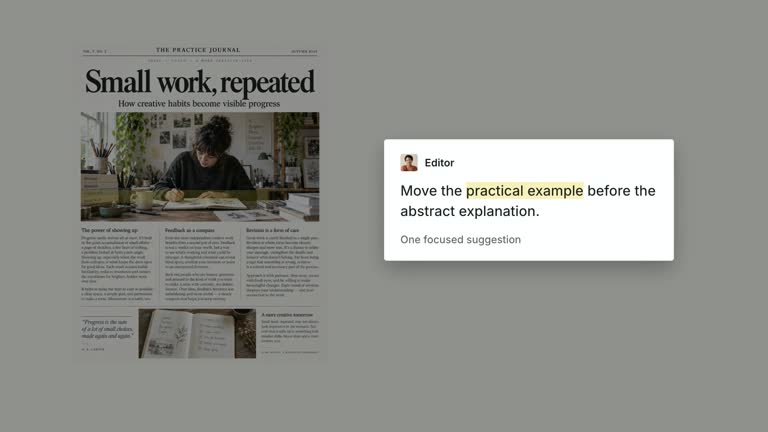
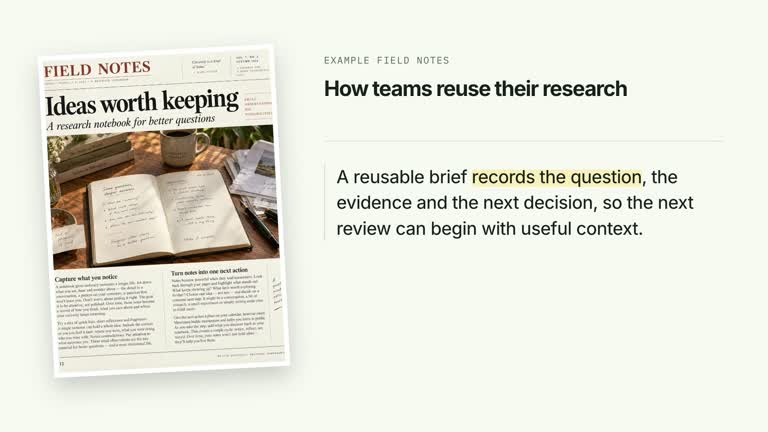
Give a quotation room to read beside a desaturated portrait, then draw attention to a chosen phrase with one short underline. Attribution settles separately and the final composition stays still. This 6.8-second scene supports a transparent presenter cutout or an explicit static-portrait variant; it presents supplied words without verifying the quotation or its attribution.
What you get
A local generator, editable HyperFrames portrait/quotation shot and motion/review instructions for a 1920×1080, 30 fps segment. Generate and render the scene after preparing the quotation and suitable portrait material.
quote, emphasisPhrase and attribution. The emphasis must exactly match a substring of the quote; the first occurrence receives the underline. presenter-matte is the preferred moving cutout input, with portrait as an explicit still-image alternative.
Portrait and quote establishment, attribution from 0.75 seconds and an underline sweep from 2.00 to 2.62 seconds. The latest revision removes the old composition drift and decorative quote mark, keeping a quiet final reading.
Four styles keep the same data and choreography: White & Yellow (white-yellow), Charcoal & Lime (charcoal-lime), Paper & Orange (paper-orange), and Black & White (midnight-ice). Semantic style overrides are supported; check contrast after changing them. Dark canvases use a fine grid. Local fonts include Inter, IBM Plex Mono for measurements and ordinals, Smiley Sans and Noto Sans SC. Chinese text selects Smiley Sans automatically, including accompanying Latin text; --zh-font noto-sans-sc selects Noto Sans SC, while --font takes precedence for a supplied font.
Before you choose
Verify the words and attribution independently, then choose a narrow emphasis that preserves the speaker’s meaning. A convincing portrait and underline should aid reading rather than manufacture authority for an unverified quote.
Good fit
A creator discussing a short, properly attributed quotation or an original statement with one specific phrase to emphasize.
A teaching passage where portrait context and editorial type should remain readable after a single emphasis gesture.
A series using consistent portrait scale, restrained underline treatment and attribution placement.
Not for
Authenticating quotations, proving authorship or generating an endorsement from the supplied person.
Automatic identification of the most important phrase, reliable fitting of a long multiline emphasis span or guaranteed clean segmentation of any footage.
Automatic full-film editing, generation of missing presenter performances or music, or copying another creator’s identity and source material.
How to use
You say/creatormotion-split-quote-underline Turn my supplied explanation into a white-yellow B-roll scene using the Quote Underline Portrait effect. Use the text, data and media I provide, and ask for any required input that is missing.
Prepare a concise quote, an exact emphasisPhrase and short attribution. Matching is literal and uses the first occurrence. If the phrase is absent there is no underline; choose a short span and inspect wrapping so the inline emphasis does not overflow the quote area.
For moving portrait material, supply a continuous take covering 6.8 seconds and an aligned cutout via --matte FILE or presenter-matte in --images. Alpha-bearing source video can serve as its own cutout. Keep frames, timing and framing aligned; do not loop a shorter recording.
Without a cutout, the default --matte auto invokes pinned HyperFrames remove-background on the local --media take and caches the result by source checksum. The guide describes first-use model downloads. Review hair, hands and fast edges; supply a better matte if needed. --matte off disables automatic cutting, and an explicit portrait image provides the static alternative under the preferred-matte policy.
Prepare Node.js 22+, FFmpeg and HyperFrames CLI 0.8.30. From the extracted package run node scripts/create.mjs --out /absolute/PROJECT --data /absolute/CONTENT.json --style white-yellow --media /absolute/PRESENTER.mp4. Use another documented palette or semantic --overrides as needed. Read the motion specification, DESIGN.md and image policy before adapting materials. For a static portrait build, use --images MAP.json --matte off and omit --media instead of supplying a moving take.
Run the generated project’s lint, validate and inspect checks, then render with the printed command. Inspect actual MP4 frames at entry, every focus change and the final reading hold for seams, clipping, contrast and media overlap. Keep essential text and interface targets readable; compare all four palettes with identical content after module changes. Narration is separate, and a silent preview does not establish audio synchronization. For the static alternative, map portrait in --images and disable automatic cutting; its image replaces the moving cutout, rather than adding a second speaker. Check desaturation, silhouette/crop, exact underline target and attribution. Provenance/checksums are recorded for matte resolution; successful generation alone does not prove clean segmentation.
Requirements and costs
You bring
quote: provide your own content or retain the illustrative default. · emphasisPhrase: provide your own content or retain the illustrative default. · attribution: provide your own content or retain the illustrative default.
Dependencies
HyperFrames CLI 0.8.30 or compatible — required · Node.js 22 or newer — required · FFmpeg — required
Outside costs
Not collected yet
Tools used
HyperFrames
Publisher testing
v1.0.2 — Claude Code / Claude Desktop / Cowork / Codex / ChatGPT
FAQ
Yes. quote, emphasisPhrase and attribution are JSON inputs, with four palettes and semantic overrides. The underline is bound to an exact substring, not an automatically chosen keyword.
For the moving variant, yes: supply a continuous 6.8-second take and an aligned cutout, alpha video or allow local automatic cutting. The explicit portrait slot supports a static image variant; it is not generated from a missing presenter.
Yes. Preserve readable portrait/quote context, the phrase underline and a still attribution hold. The current revision removes the older drift, so do not assume the whole canvas moves.
The first exact occurrence is wrapped and underlined. Reword the input or deliberately change the matching logic if you need a later occurrence.
No. The local process can fail or leave imperfect edges. Inspect the rendered result and use a better aligned matte when necessary; the cache avoids repeating the operation for the same source checksum.
The guide recommends supplying 4K footage and adding --resolution landscape-4k to the printed render command. Review the actual output and cutout detail at that resolution rather than assuming a 1080p preview proves 4K quality.
User reviews
—0 reviews
Select a star to share your experience.
No reviews yet. Ratings appear once readers share real experiences.