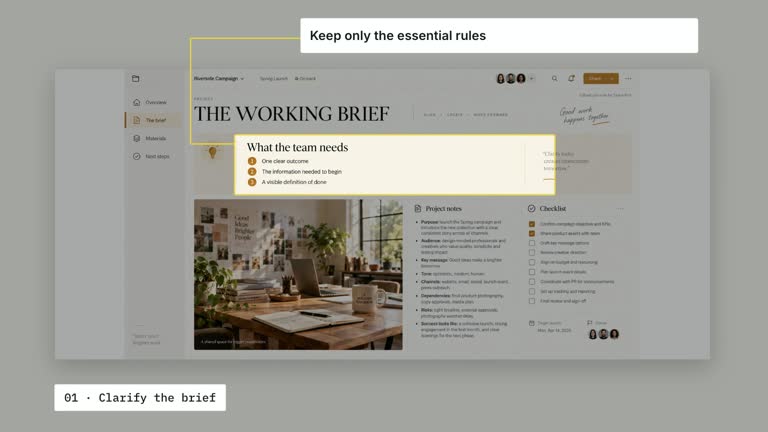
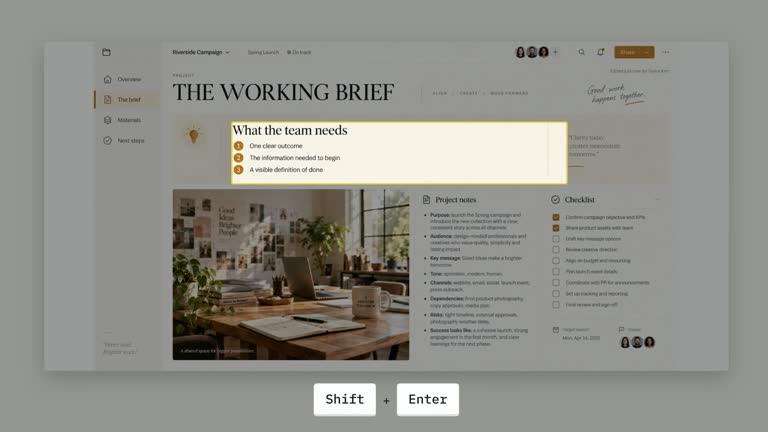
Make an editorial suggestion easy to follow without losing its source context. A document remains behind a lifted comment while selected phrases receive separate marker sweeps. This nine-second scene uses a supplied document, author label and comment; it does not review the document, write the suggestion or identify which words should be emphasized.
What you get
A local generator, editable HyperFrames document/comment shot and motion/review instructions for a 1920×1080, 30 fps segment. Generate and render an explanation of your prepared editorial feedback.
document, commentAuthor, comment, highlightRanges and anchor inputs. The document slot and comment-avatar are required rasters with bundled example material; source selection, comment copy and marker spans remain editable overlays.
A document entrance, source-line marker from 0.70 seconds, dimming layer from one second and comment entrance from 1.20 seconds. Comment highlights sweep from 2.50 seconds at 1.40-second intervals, followed by a still reading of source and suggestion.
Four styles keep the same data and choreography: White & Yellow (white-yellow), Charcoal & Lime (charcoal-lime), Paper & Orange (paper-orange), and Black & White (midnight-ice). Semantic style overrides are supported; check contrast after changing them. Dark canvases use a fine grid. Local fonts include Inter, IBM Plex Mono for measurements and ordinals, Smiley Sans and Noto Sans SC. Chinese text selects Smiley Sans automatically, including accompanying Latin text; --zh-font noto-sans-sc selects Noto Sans SC, while --font takes precedence for a supplied font.
Before you choose
Write one useful editorial request first, then mark only the phrases that make the requested change clear. Verify both source anchoring and comment offsets so visual emphasis does not attach a good suggestion to the wrong material.
Good fit
A creator explaining one focused revision request with enough document context to understand it.
A short teaching passage where two chosen phrases clarify what an editor is asking to change.
A series with consistent document imagery, comment typography and restrained marker timing.
Not for
Automatically critiquing a draft, locating the relevant source sentence or revising the document.
Arbitrary overlapping text ranges, automatic OCR-based anchoring or a long collection of comments in one fixed scene.
Automatic full-film editing, generated presenter footage or music, or copying another creator’s identity and materials.
How to use
You say/creatormotion-spotlight-comment-emphasis Turn my supplied explanation into a white-yellow B-roll scene using the Comment Emphasis effect. Use the text, data and media I provide, and ask for any required input that is missing.
Prepare document, commentAuthor and one concise comment. Define highlightRanges as nonoverlapping [start,end] string offsets within that comment, with the end excluded. Check indices after every text change; the implementation sorts ranges for markup but does not infer the phrases or validate editorial meaning.
Set anchor as normalized [x,y] on the document plane and inspect the selected source-line marker beside the comment. It is a coordinate overlay, not text detection. Account for image fit and any blank margins when replacing the source document.
Reuse the bundled document/avatar or replace their named slots through --images MAP.json, with relative paths resolved beside the map. Although an older guide calls the screenshot optional, this effect requires both document and comment-avatar images; there is no active wireframe fallback. Follow the image policy. No presenter or matte is used.
From the extracted package, prepare Node.js 22+, FFmpeg and HyperFrames CLI 0.8.30. Run node scripts/create.mjs --out PROJECT --data CONTENT.json --style white-yellow, substituting another documented palette if wanted. Read the motion specification and image policy before adapting the scene; use semantic --overrides for deliberate style changes.
Inspect the editable project at entry, each motion handoff and final hold, then render with the command printed by the generator. Check the resulting frames for text collisions, correct numbers and readable contrast. Keep at least 1.2 seconds for the final reading when editing, and compare all four palettes with identical content after structural changes. Narration, music and assembly into a longer film remain separate work. Check exact highlighted words, range boundaries, source-line position, comment-author identity and final crop in actual MP4 frames. Keep the comment and source stable after the reveals, preserve at least 1.2 seconds of final reading when editing and avoid adding more ranges than the schedule can accommodate.
Requirements and costs
You bring
document: provide your own content or retain the illustrative default. · commentAuthor: provide your own content or retain the illustrative default. · comment: provide your own content or retain the illustrative default. · highlightRanges: provide your own content or retain the illustrative default. · anchor: provide your own content or retain the illustrative default.
Dependencies
HyperFrames CLI 0.8.30 or compatible — required · Node.js 22 or newer — required · FFmpeg — required
Outside costs
Not collected yet
Tools used
HyperFrames
Publisher testing
v1.0.1 — Claude Code / Claude Desktop / Cowork / Codex / ChatGPT
FAQ
Yes. The five documented fields are JSON inputs, with four palettes and semantic overrides. Character ranges must be recalculated when comment text changes; they are not semantic keyword selectors.
No presenter footage is needed. Required document and comment-avatar rasters have bundled defaults and can be replaced locally. Generic media guidance does not add a video or matte requirement here.
Yes. Preserve source selection, comment lift and sequential phrase emphasis, then a still reading hold. Re-render after text or anchor changes and check the actual marked content.
No. anchor is supplied geometry. The effect does not OCR the document or connect the comment to matching words by analysis.
They use JavaScript string slicing. Emoji and some combined characters can make naive visual counting unreliable; inspect the generated spans and avoid splitting a character sequence.
User reviews
—0 reviews
Select a star to share your experience.
No reviews yet. Ratings appear once readers share real experiences.